
|

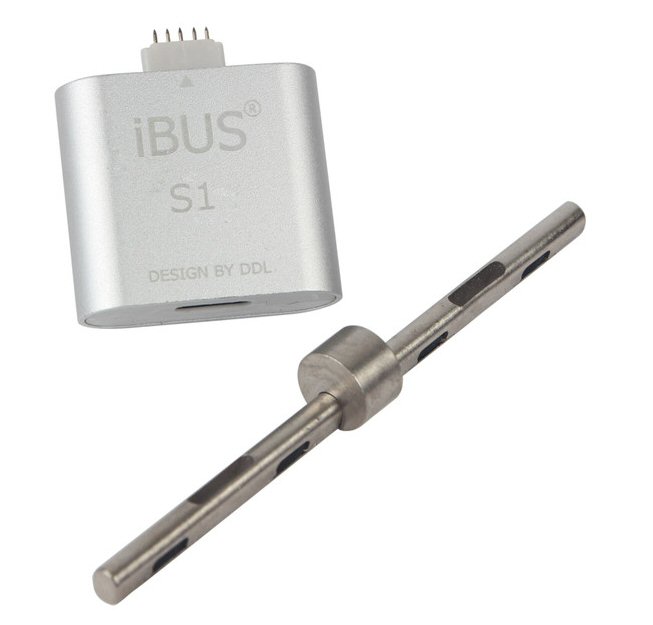
iBus S1 Tool For MFC Dongle Flash Apple Watch S0 & S1
✅ WHAT IS IT? - This USB 2.0 iBus S1 tool connects your Apple Watch S0 & S1 (38mm & 42mm) with 8Pin USB cable to your computer’s USB port for restore & upgrade and repair software etc.
✅ WHY DO I NEED IT? - Also can fix related issue once Apple Watch glass digitizer touch got replacement. Eg, If your Apple Watch displays a red exclamation point after a software update, this can easily solved by iBus so no more need to contact Apple Support for service / repair and so on.
✅ MFC DONGLE IS REQUIRED - This is an add-on device for users who already own MFC Dongle, it will not work standalone.
✅ !! WARNING !! SIGNED FIRMWARE REQUIRED - Please be sure you have valid MFC SIGNED FIRMWARE'S before purchasing, and note that APPLE may stop signing the firmware at any time. The flash can only be done with signed firware.
✅ SUPPORT - You can access downloads for firmware's from MFC site once you have purchased this S1 tool.
WHAT IS IT? - This USB 2.0 iBus S1 tool connects your Apple Watch S0 & S1 (38mm & 42mm) with 8Pin USB cable to your computer’s USB port for restore & upgrade and repair software etc.
WHY DO I NEED IT? - Also can fix related issue once Apple Watch glass digitizer touch got replacement. Eg, If your Apple Watch displays a red exclamation point after a software update, this can easily solved by iBus so no more need to contact Apple Support for service / repair and so on.
MFC DONGLE IS REQUIRED - This is an add-on device for users who already own MFC Dongle, it will not work standalone.
!! WARNING !! SIGNED FIRMWARE REQUIRED - Please be sure you have valid MFC SIGNED FIRMWARE'S before purchasing, and note that APPLE may stop signing the firmware at any time. The flash can only be done with signed firware.
SUPPORT - You can access downloads for firmware's from MFC site once you have purchased this S1 tool.
Product information:
- Full Support Apple Watch 38mm & 42mm
- Apple Watch Series 0 (1st Generation) 38 mm (A1553 N27aAP), 42 mm (A1554 N28aAP)
- Apple Watch Series 1 38 mm (A1802 N27dAP), 42 mm (A1803 N28dAP)
- Support Apple Watch restore and repair software
- Support Downgrade and upgrade firmware
- Support Apple Watch Glass Digitizer touch programming etc
- Working with MFC Dongle software using Windows (Not Free)
How to go to DFU & Recovery mode for Apple Watch ?
- How to go to DFU mode for Apple Watch ?
- Press and hold both the Digital Crown and the Side Button (Or called Power on Button), Waiting screen shutdown and keeping 3 seconds then releasing Side Button (Or called Power on Button).
- Keep holding Digital Crown and waiting 10 seconds.
- How to go to Recovery mode for Apple Watch ?
- Press and hold both the Digital Crown and the Side Button (Or called Power on Button), Waiting screen shutdown and keeping 3 seconds .
- Releasing Side Button (Power on) and Digital Crown , and immediately holding Digital Crown and waiting 10 seconds.
Support Forum:
- http://forum.gsmhosting.com/vbb/f1023
Package content:
- 1 x iBUS S1 Tool
- 1 x Two in one adapter pilot pin
-
BrandMFC
-
TypeUSB Cable Adapter
-
Compatible ModelFor Apple Watch S1, For Apple Watch S0
-
MaterialPlastic
-
Compatible BrandFor Apple Watch S1, For Apple Watch S0
-
ColourSilver
-
Modelibus1
-
Model Numberibus1
-
Length4cm
-
Width3cm
-
Country/Region of ManufactureChina
-
Manufacturer warranty3 Months from date of purchase
-
Weight0.08kg
-
depth0.7cm
-
Height0.7cm
-
Number of Pieces1
-
Unit Quantity1
-
Unit TypeUnit
-
Year Manufactured2023
-
Dispatches FromUnited Kingdom
-
Supported DevicesFor Apple Watch
-
QTYYes
-
Custom InfoApple Watch